
There’s this huge myth floating around, like a ghost people are scared of, that says you must be an embroidery expert to create a PES file for Brother embroidery machines. Honestly, nonsense. It’s the same kind of myth people used to whisper about coding: “Oh no, only engineers with giant glasses and calculators can do that.”
But here we are in 2026, and you can literally generate half a website on your phone while sipping coffee. Expertise is great, sure, but sometimes being too experienced makes you blind to shortcuts, which is why many beginners first discover embroidery digitizing services when they realize they don’t have to do everything the hard way.
Beginners? They’re curious, reckless (in a good way), and not afraid to mess things up. And PES files, the embroidery design format used by Brother and Babylock machines, are not a sacred mystery. They’re just data.
I still remember the first time I tried converting a PNG logo into a PES embroidery file. The screen froze, the thread count numbers scared me, and I thought I’d ruined my machine forever. Guess what? Ten minutes later, a YouTube tutorial on “how to convert JPG to PES format free” saved the day. That’s the thing. Beginners stumble into solutions because they’re not chained by “rules.” They press the wrong buttons, and sometimes that’s the magic.
Need a Professional Embroidery File?
If you want clean, production-ready embroidery files, Embpunch provides professional embroidery digitizing services for logos, caps, patches, jackets, polos, and more.
Strategy 1: Start with Free Software Instead of Pricey Tools
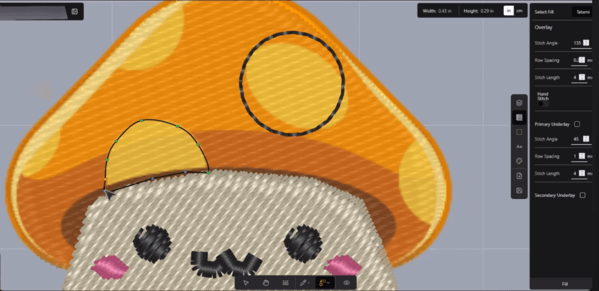
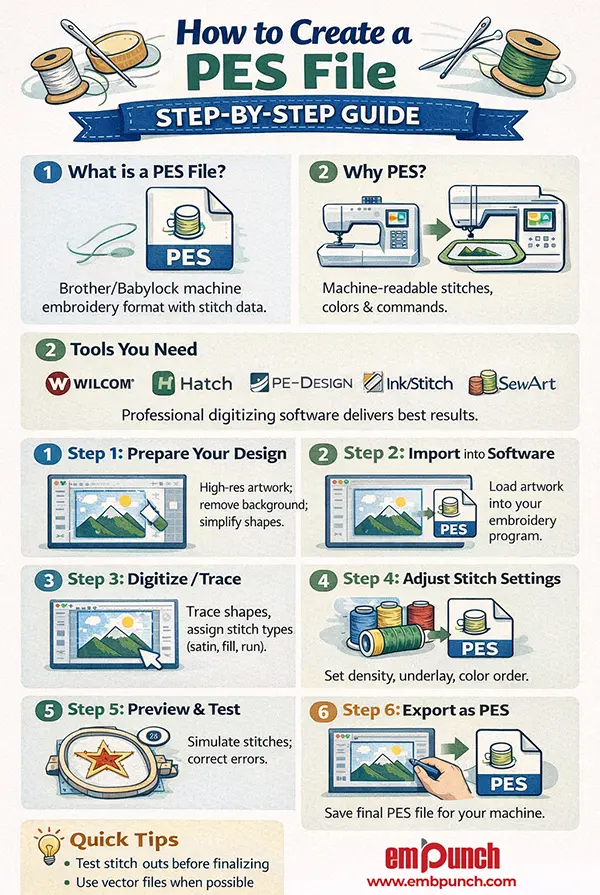
Experts love their thousand-dollar software packages like Wilcom Embroidery Studio or Hatch. But here’s the reality: free or cheap programs like Ink/Stitch (an Inkscape extension) or even trial versions of PE-Design Lite can get you 80% of the way there. That’s like saying you don’t need a Ferrari to learn driving; a beat-up Suzuki will do just fine.
The brilliance of starting small is this: you don’t get paralyzed by complexity. Experts often drown in options, tweaking stitch angles until the cows come home. Beginners? They just want the embroidery file to run on their Brother machine. And honestly, half the time that’s enough.
Oh, and there’s something satisfying about getting results with zero budget. Like cooking a gourmet meal out of leftover dal and half an onion, you feel clever. Beginners can ride that wave of scrappiness.
Quick Note:
Tip: Search for “free PES file converter tools online.” There are dozens, and while they’re not perfect, they let you test drive your creativity without breaking the bank.
Strategy 2: Follow the Click-First-Understand-Later Rule
Sounds chaotic? It is. But it works. Instead of reading 50-page manuals on how PES formats handle stitch density and jump stitches, just open up the program and click buttons. Add a stitch. Change the thread colour. Export. Break things. Watch them fail. Then try again.
Experts, by contrast, overthink. They hesitate. Beginners don’t have that baggage, and that impulsiveness can accelerate learning. It’s like kids on TikTok; they don’t ask whether their dance is “technically perfect.” They just record, upload, and sometimes go viral overnight.
Creating PES embroidery design files has the same energy. Click, save, test. Who cares if the first file stitches like spaghetti? You’ll fix it. And that speed of iteration builds real competence faster than any course.
Strategy 3: Lean on Communities, Not Credentials
Here’s a wild truth: you don’t need formal training when there are entire Facebook groups, Reddit threads, and Discord servers full of embroidery geeks who love helping newbies.
Back in March 2024, there was this viral Reddit post, in which someone had turned their cat’s blurry selfie into a digitized PES patch. Everyone roasted the result, but then the comments section basically turned into a free crash course on embroidery digitizing software tips. That’s how learning looks today: collaborative, messy, and way faster than sitting in a classroom.
Experts hoard knowledge. Beginners, when they ask, get answers. And the humility of saying “I don’t know what stitch density means, help?” opens doors. People root for underdogs more than polished pros.
Bonus: Many free PES file tutorials on YouTube are created by hobbyists, not professionals. That rawness makes them easier to follow.
Strategy 4: Use Templates and Presets Shamelessly
Here’s the part most gurus won’t admit: they use presets too. Nobody digitizes from scratch every single time, it’s exhausting. PES file creation software often comes with templates for lettering, borders, and stitch patterns. Beginners can grab those and modify.
It’s like cooking with instant noodles. You add an egg, a sprinkle of chilli, and suddenly it feels gourmet. The embroidery machine doesn’t care whether you built the design from “expert geometry” or tweaked a ready-made preset. What matters is: does it stitch?
So yes, templates aren’t “cheating”, they’re smart. Beginners shouldn’t feel guilty. Start with a base and make it yours. The shortcut isn’t laziness; it’s efficiency.
Strategy 5: Fail Loudly and Publicly
Perfectionism kills creativity. Beginners who share their botched PES attempts online often improve faster. Why? Because critique, even the harsh kind, accelerates skill. I once posted a design where the stitches bunched so badly it looked like a melted pizza. Someone DMed me, “reduce your underlay stitches,” and, boom, game-changer.
Experts hide their mistakes; they’re too invested in reputation. Beginners don’t have that problem. They can laugh at their failures. And laughter is fuel.
Besides, people love following journeys, not polished end results. Documenting your PES file learning curve, posting your first ugly duckling files, might even make you a mini influencer in the embroidery space. Stranger things have happened (remember that AI-generated Pope in a puffer jacket meme? The whole internet believed it).
The Beginner’s Edge
See, here’s the paradox. Everyone thinks success in how to create PES files requires years of training, but often it’s the beginner mindset that sparks speed and creativity. Beginners don’t over-analyse, they experiment. They don’t over-invest; they make do. And they don’t fear embarrassment; they treat it as part of the process.
We’re living in an age where embroidery digitizing software is friendlier, tutorials are endless, and communities thrive on sharing. Expertise? Valuable, yes. But it’s not the ticket in. Curiosity is.
How To Fix Pes File Not Recognised Errors?
“PES file not recognised” error, it hits you like stepping on a Lego in the middle of the night. One second, you’re all set to stitch a beautiful design, the next, your Brother machine is blinking at you like it’s questioning your very existence: “Who… are you?” Frustrating, yes. Infuriating, even. But there’s usually a way through this mess, trust me.
1. Versions Matter More Than You Think
Not all PES files are created equal, shocking, I know. Older Brother machines can’t read PES files exported from newer software like Hatch 2026 or Wilcom 2023. It’s like trying to plug a USB-C cable into a 1999 iMac. Nope. Doesn’t work.
Fix:
-
Open the file in your embroidery software.
-
Re-export it in a PES version compatible with your machine (manuals are tedious but sometimes lifesavers).
-
Pro tip: “latest version only” settings are basically a trap for older machines.
2. File Corruption – The Silent Killer
Sometimes files just… die. They get corrupted in the ether, USB transfers, SD cards, emails… all potential culprits. The symptoms? Blank files, weirdly small sizes, instant “file not recognised” errors. Like the design ghosted you.
Fix:
-
Re-download or re-export from the original software.
-
Test the file on another machine or software if possible, and rule out hardware acting shady.
3. Filenames – Yes, Really
Brother machines are picky, almost diva-level picky.
-
Stick to letters, numbers, and underscores. No spaces, no symbols, no emojis (tempting though it is).
-
Double-check that the extension is .PES. Don’t let it sneakily become .TXT or .ZIP.
Quick Note:
Fun anecdote: I once wasted half an hour chasing a “file not recognised” error, only to realize my file was called “Floral-Design#1.pes”. That little “#” was the villain.
4. Transfer Method – Tiny Details, Big Consequences
USB drives need to be FAT32, not NTFS, not exFAT. SD cards sometimes act up depending on the Brother model. Less is more here: small, simple USB sticks without extra clutter often work best. It’s ridiculous, but true, machines have favourites.
5. Firmware Updates – Yes, Update That
Outdated firmware can make your PES file suddenly unreadable. Brother releases updates to fix weird quirks and compatibility nightmares.
Fix:
-
Check your model on Brother’s website.
-
Follow instructions carefully when updating (it’s a nerve-wracking but necessary process).
6. File Origin – Sometimes the Culprit is Exotic
PES files made in third-party embroidery digitizers might contain stitches or features your Brother machine simply cannot process. Tiny satin effects, pull compensation, things that sound fancy but cause chaos.
Fix:
-
Open and re-save the file in your embroidery software, targeting Brother output.
-
Strip exotic or unsupported stitch types. Keep it simple. Sometimes, simple is beautiful.
Important:
Reality Check: 9 times out of 10, “PES file not recognised” isn’t your machine dying, it’s a combination of file version, corruption, naming quirks, and unsupported features. Approach methodically. One tiny step at a time.
Honestly, PES errors are like life: chaotic, slightly unfair, but mostly fixable if you approach them patiently (and maybe with a cup of coffee in hand).
How To Fix Pes File With Missing Stitches?
1. Hunt for the Missing Stitches
Before panicking (or throwing your USB in the air), open the PES file in Embird, Wilcom, Hatch… whatever you have. Zoom in. Really zoom. Look for empty zones, invisible blocks, or layers that vanished into the void.
Sometimes, it’s not actually missing; it’s hiding. Maybe a layer got misassigned, or a colour block is invisible. It’s like looking for your glasses while they’re on your head. True story: I once spent an hour cursing missing stitches only to realise they were just under an invisible satin layer. Murphy’s Law, right?
2. Colour Codes – The Usual Suspects
PES files rely on thread colour codes, but machines are picky. Brother, Babylock, and Singer each have their own vocabulary.
-
A colour code the file uses might not exist on your machine.
-
That tiny section? It simply refuses to stitch.
Solution: remap those phantom blocks to a thread your machine recognises. Personally, I keep a mental cheat sheet of common colour mismatches; it saves tears, and probably my sanity.
3. Stitch Types and Density – Too Much Drama
Some fancy stitches, like fill patterns, motif blends, or speciality stitches, can trip your machine. Overly dense areas? Thread breaks. Skipped stitches. Fabric puckering. Chaos.
Fix:
-
Reduce stitch density slightly.
-
Convert unsupported stitches to standard fills or satin stitches. Your machine will thank you.
Think of it like overloading a roller coaster: too many people in one car, and it just won’t run.
4. Re-digitise or Repair the File
Sometimes the PES file is partially corrupted. Maybe a previous export went sideways, maybe the designer had a rough day.
-
Use your software’s repair or re-digitising tools.
-
Focus on the affected objects, not the entire design. Time is precious, after all.
5. Test Stitch – Small, But Mighty
Always test on scrap fabric first. Seriously. Tiny patch, big reassurance.
-
Check if the missing areas now appear.
-
Adjust stitch density, colour mapping, or object placement if something looks off.
Skipping this step is basically asking for heartbreak on your favourite fabric. True confession: I learned this the hard way with a silk scarf that now lives in my “lessons learned” drawer.
6. Export & Compatibility
After repairs:
-
Re-export the PES file for your specific machine.
-
Check hoop size, colour mapping, stitch types, everything. Even minor mismatches can cause big surprises.
Pes Embroidery File Won’t Open: How To Fix Corrupted Pes Files
1. Are You Sure It’s Corrupted?
Not every “won’t open” is catastrophic. Sometimes the file is just… confused. Maybe:
-
The extension is wrong (yes, .TXT or .ZIP masquerading as PES, classic).
-
The file transfer went sideways and only part of it survived.
-
Or the software versions are incompatible (Wilcom 2025 PES vs. Brother 2017 PES, like trying to play Fortnite on a Game Boy).
Quick Tip:
Try opening it in another embroidery program. One software might see what another stubbornly refuses.
2. Re-download or Re-export. Fresh Start
Corruption often sneaks in during downloads, USB transfers, or emails. Your best bet? A fresh copy from the source.
-
Re-export the PES from the original software.
-
Avoid unnecessary renaming or compressing before transferring.
-
Even moving files through multiple devices can quietly introduce errors that explode later. True story: I once watched a nearly finished floral monogram vanish into digital oblivion because someone emailed it twice. Painful.
3. Software Repair Functions. Your Tiny CPR Kit
Programs like Hatch, Wilcom, and Embird have repair/recovery tools.
-
Look for “Repair File,” “Check Stitches,” or “Optimize.”
-
It’s like giving your PES file a gentle CPR, slow, patient, almost therapeutic.
4. Check File Size. A Sneaky Clue
File size can tell you a lot:
-
Too small? Likely truncated or incomplete.
-
Too large? Maybe corrupted extra data or export errors are bloating it.
Sometimes re-exporting or tweaking stitch density normalizes the file. Kind of like ironing out wrinkles in a silk scarf, you can fix it, but carefully.
5. Convert or Resave the File
Oddly, PES files sometimes “wake up” after a format round-trip.
-
Open it in a software that reads it (even partially).
-
Export as a new PES or another compatible format, like DST.
-
Re-import if needed.
Think of it like translating a novel into another language and back; some quirks vanish, but the story survives.
6. Test on Another Device or Machine
Sometimes, corruption isn’t the file at all; it’s your machine being dramatic.
-
Try another Brother, Babylock, or Singer.
-
Or open it in a different embroidery program.
You might realize the “corruption” was just a phantom, like a cloud in an otherwise clear sky.
So, if you’ve been hesitating to learn how to create a PES embroidery file, waiting for that mythical “expert badge”, stop. The tools are free, the knowledge is everywhere, and your mistakes will be your greatest teachers. Don’t let the ghost of “expertise” scare you away.
Fire up a free program tonight. Import a doodle, convert it into PES format, and see what happens. Maybe it stitches beautifully. Maybe it looks like spaghetti. Either way, you’ve started.
And here’s the wildest truth: starting is the only expertise that matters.
How EmbPunch Can Help You
Now, if you’d rather skip the headaches, that’s where a service like online embroidery digitizing makes sense. Instead of wrestling with PES embroidery file errors, they prepare ready-to-stitch PES files, calibrated for your hoop size, machine version, and thread chart.
Think of them as your embroidery safety net. You focus on creating, they handle the technical PES digitizing problems.